 Skip to content

How to Migrate GoHighLevel to ClickFunnels
By Marius Kiniulis – September 20, 2025
We use affiliate links and may receive a small commission on purchases (at no extra cost to you). Learn more.
 The easiest way to migrate GoHighLevel funnels to ClickFunnels is by using BarnumPT, a free browser extension created by the ClickFunnels team.
BarnumPT’s Instant Page Transfer feature copies funnels from GoHighLevel into ClickFunnels in minutes, avoiding the need to rebuild pages manually.
Here’s how the process works:
- 📝 Get a ClickFunnels account → Go to Clickfunnels.com and create your ClickFunnels account.
- 🧩 Install BarnumPT from BarnumPT.com on Chrome or Microsoft Edge.
- 🔑 Log in with your ClickFunnels account.
- 📂 Open the funnel you want to move in GoHighLevel.
- 🔄 Transfer your funnels with BarnumPT.
- 👀 Review the funnel inside ClickFunnels, reconnect any necessary integrations, and test it before publishing.
👉 What transfers automatically? Page layouts, content, and designs.
👉 What doesn’t? Automations, integrations, and custom code need to be re-added in ClickFunnels.
BarnumPT is free to use for migrations, with an optional upgrade called Barnum AI & Barnum Scripts ($1 trial → $297/year) that adds AI-built funnels, ads, and email campaigns.
Contents
- How to Migrate GoHighLevel to ClickFunnels
- 🧰 What You’ll Need Before Migrating
- 🔄 Why Would You Migrate from GoHighLevel to ClickFunnels?
- ⚠️ What Are the Challenges of Migrating Funnels Manually?
- 🧩 What Is BarnumPT and How Does It Help with Migration?
- 💰 How Much Does It Cost to Use BarnumPT for Migration?
- 📥 Step-by-Step: How to Migrate GoHighLevel Funnels to ClickFunnels with BarnumPT
- 🔍 What Transfers Automatically and What Doesn’t?
- ✅ Best Practices for a Smooth Migration
- ❓ Frequently Asked Questions
- 1. Can I migrate my email automations from GoHighLevel to ClickFunnels with BarnumPT?
- 2. Will my GoHighLevel membership sites transfer into ClickFunnels?
- 3. Does BarnumPT copy over tracking codes and pixels?
- 4. Can I keep the same URLs after moving from GoHighLevel to ClickFunnels?
- 5. How long does a typical migration take with BarnumPT?
- 🚀 Ready to Move Your Funnels?
🧰 What You’ll Need Before Migrating
Before you start the migration, make sure you have these in place:
- 🔑 A ClickFunnels account → Sign up at ClickFunnels.com so you have a place to import your funnels.
- 🧩 BarnumPT browser extension → Install it for free from BarnumPT.com on Chrome or Microsoft Edge.
- 📂 Your GoHighLevel account login → You’ll need access to the funnels you want to transfer.
🔄 Why Would You Migrate from GoHighLevel to ClickFunnels?
The primary reason people switch from GoHighLevel to ClickFunnels is its simplicity.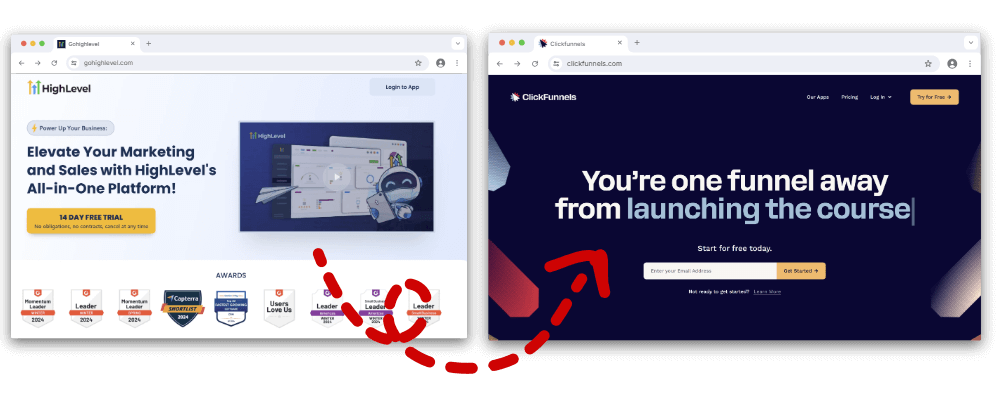 GoHighLevel is powerful for agencies, but it can feel overwhelming if all you really need is a sales funnel that’s fast to build and easy to launch.
ClickFunnels was designed for that exact purpose.
Look:
If you’re managing dozens of client accounts, GoHighLevel makes sense.
However, if you’re a business owner looking to sell a product, run a webinar, or build a membership site, ClickFunnels provides the tools without the added complexity.
Here’s what usually drives the switch:
- ⚡ Ease of use → ClickFunnels funnels can be built and launched faster.
- 🎯 Conversion focus → optimized templates and funnel structures designed to sell.
- 📚 Education & community → Russell Brunson’s training, Funnel Hacking Live, and a massive user base.
- 🚀 Speed & performance → ClickFunnels 2.0 pages generally load faster than GoHighLevel funnels.
- 🔄 BarnumPT integration → you can transfer GoHighLevel funnels into ClickFunnels in minutes.
And the best part?
ClickFunnels continues to release features for entrepreneurs, while GoHighLevel focuses more on agency tools.
If you’re in the first group, you’ll often get more value by running your business on ClickFunnels.
⚠️ What Are the Challenges of Migrating Funnels Manually?
Migrating funnels manually from GoHighLevel to ClickFunnels is slow and error-prone.
Every page has to be rebuilt one section at a time, and many elements don’t carry over, which creates extra work.
The main challenges are:
- 🕒 Time-consuming → a multi-step funnel can take hours or even days to recreate.
- 🧩 Design mismatches → fonts, spacing, and colors rarely look identical once copied.
- ❌ Missing elements → pop-ups, timers, or embedded forms often don’t transfer properly.
- 📧 Reconnecting tools → email services, automations, and payment gateways must be set up again.
- 📉 Risk of mistakes → even small errors in copy, links, or integrations can hurt performance.
Here’s the thing:
Manual migration isn’t impossible, but it’s inefficient.
The more pages you have, the higher the chance of errors — which is why most people look for tools like BarnumPT to speed up the process and keep their funnels consistent.
🧩 What Is BarnumPT and How Does It Help with Migration?
BarnumPT is a free browser extension developed by the ClickFunnels team that accelerates funnel migration.
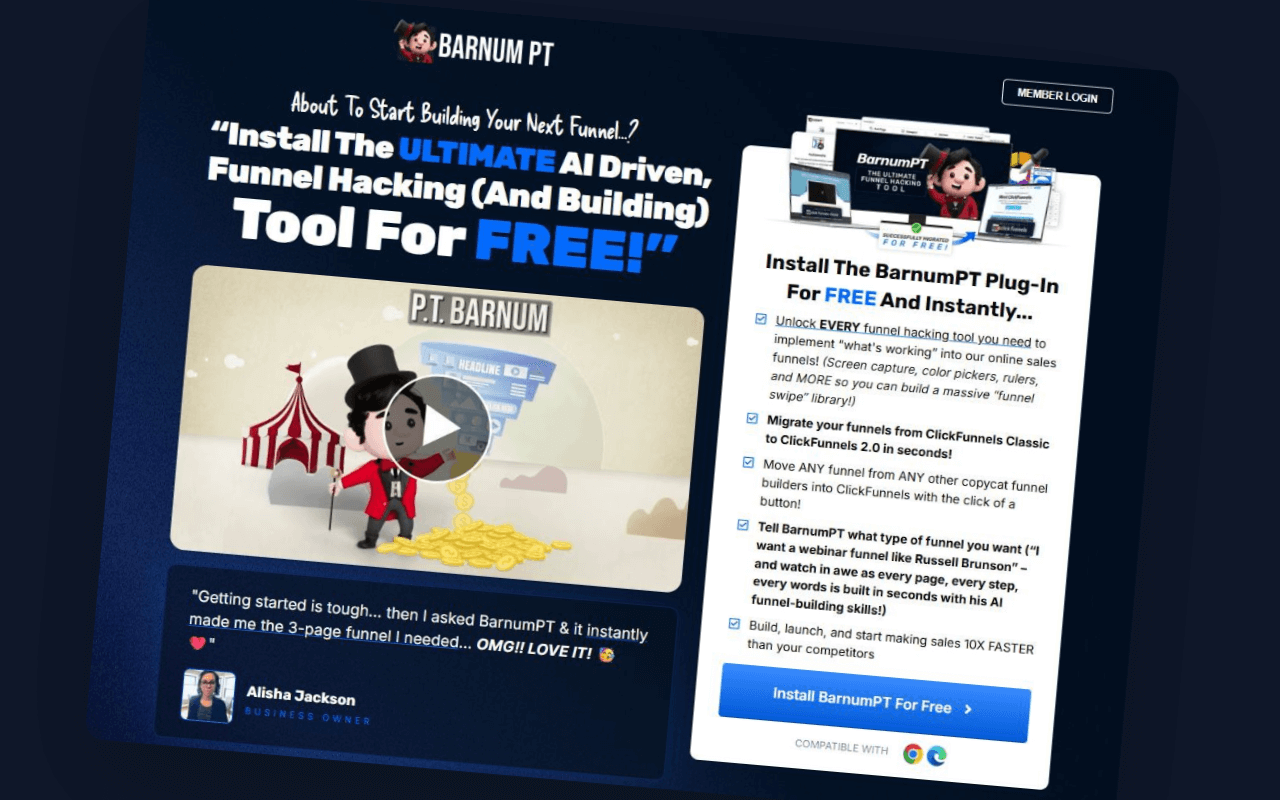
Its Instant Page Transfer feature lets you copy funnels from GoHighLevel directly into ClickFunnels with just a few clicks.
Here’s how it helps specifically with migration:
- 🔄 Direct transfer → funnels can be copied from GoHighLevel into ClickFunnels 2.0 without needing to rebuild pages.
- 🎨 Layout preservation → page structures, sections, and design elements come across automatically.
- 🧩 Element coverage → core components like headlines, images, and buttons transfer correctly, while integrations and automations may still need to be re-added.
- 🌐 Cross-platform support → also works for moving funnels between ClickFunnels Classic and ClickFunnels 2.0.
Now, here’s the thing:
If you’ve ever tried to rebuild a GoHighLevel funnel manually inside ClickFunnels, you know how much time it eats up.
I’ve seen people spend hours fixing spacing, fonts, and broken links.
With BarnumPT, that same funnel can typically be set up in your ClickFunnels account in minutes.
So the way I look at it is this:
BarnumPT takes care of the heavy lifting — moving your pages over — while you stay focused on the finishing touches, such as testing and reconnecting your tools.
💰 How Much Does It Cost to Use BarnumPT for Migration?
BarnumPT is free to install and use for moving funnels from GoHighLevel into ClickFunnels.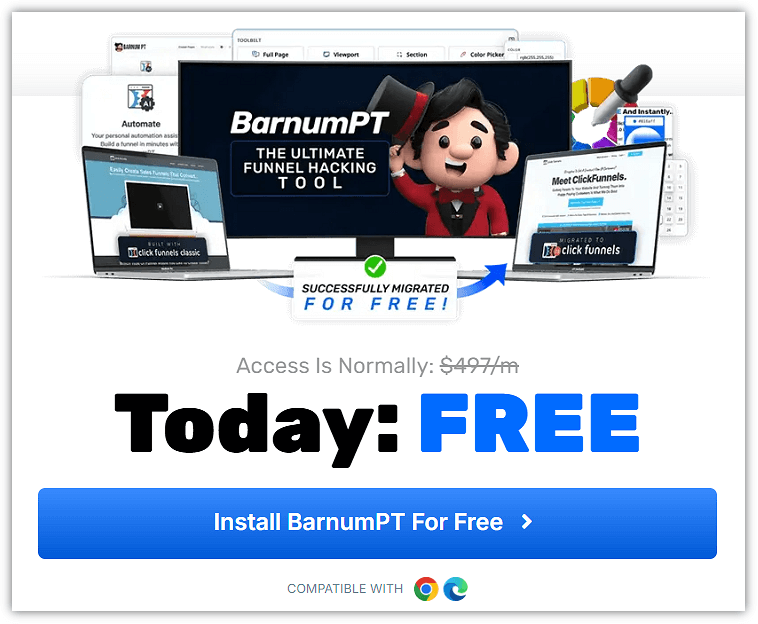
The Instant Page Transfer feature — which handles the migration — is included in the free extension, so you don’t pay anything to copy your funnels.
But here’s the twist:
There’s also an optional upgrade called Barnum AI & Barnum Scripts.
This plan goes beyond migration and uses AI to build entire funnels, write sales copy, ads, webinar scripts, and emails.
Pricing looks like this:
- 🆓 Free → Funnel migration, AI page building (basic), and Funnel Hacker Toolbelt.
- 💲 Paid Upgrade → $1 trial for 3 days, then $297 per year (beta pricing).
For migration alone, the free version is all you need.
If you want AI to handle copywriting and marketing assets too, the upgrade is where that comes in.
📥 Step-by-Step: How to Migrate GoHighLevel Funnels to ClickFunnels with BarnumPT
BarnumPT makes it possible to move funnels from GoHighLevel into ClickFunnels 2.0 in just a few steps.
Instead of rebuilding each page manually, you can copy entire funnels with its Instant Page Transfer feature.
So how do you actually do it?
Here’s the process 👇
- 📝 Get a ClickFunnels account → You’ll need an active ClickFunnels 2.0 account from ClickFunnels.com to receive the migrated funnels.
- 🧩 Install BarnumPT → Go to BarnumPT.com and add the extension to Chrome or Microsoft Edge.
- 🔑 Log in → Connect BarnumPT with your ClickFunnels account.
- 📂 Open your GoHighLevel funnel → Pick the page or funnel you want to move.
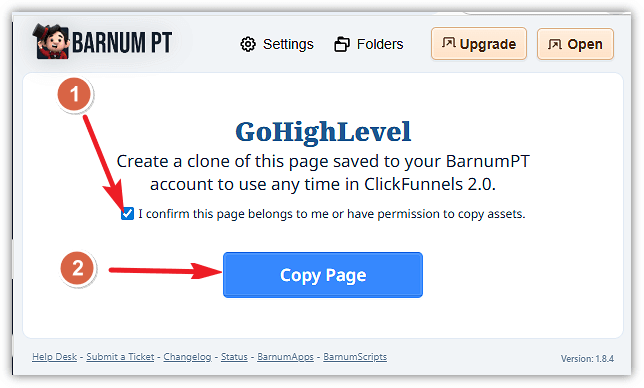
- 🖱️ Save page with BarnumPT → Open your Chrome extensions, go to BarnumPT, and under the Page Transfer section, click “Save Page as a Copy.”
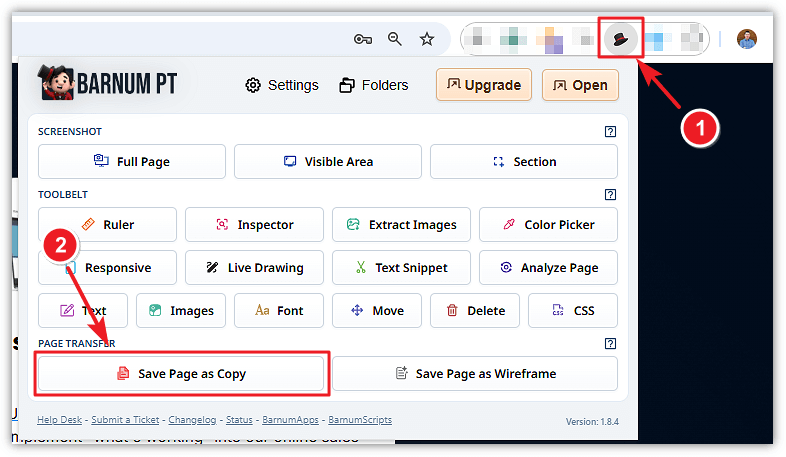
- ✅ Confirm permissions → A window will open. Toggle “I confirm this page belongs to me or I have permission to copy assets” and then click “Copy Page.”
- 🚀 Go to ClickFunnels builder → Inside your ClickFunnels account, open the funnel builder and look for the BarnumPT icon in the top menu.

- 📋 Import the copied funnel → Click the BarnumPT icon, choose “Copied Pages,” select the funnel you want to import, and then click “Import.”
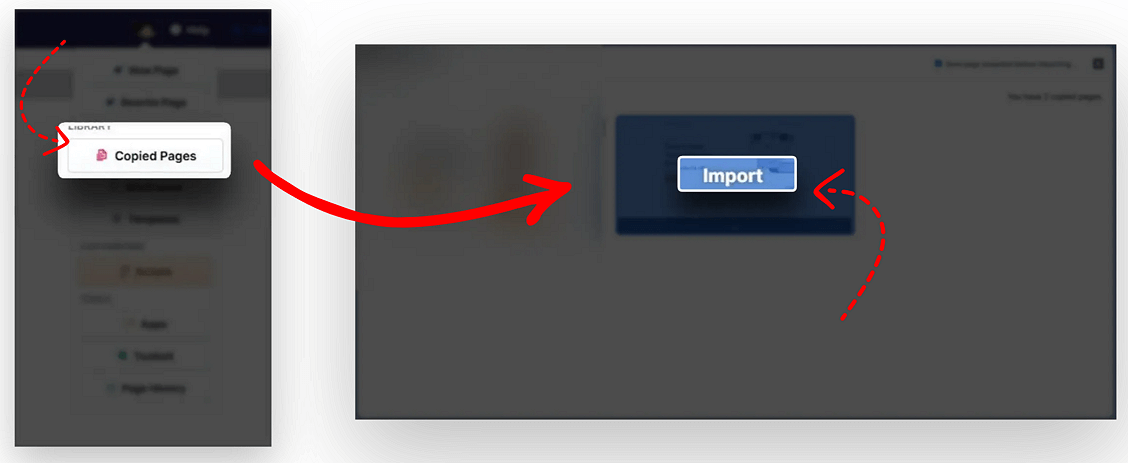 BarnumPT will start transferring the funnel into your ClickFunnels account.
 - 👀 Review in ClickFunnels → Once imported, check the funnel inside ClickFunnels and adjust layouts, links, or integrations as needed.
And that’s it ✅ — what used to take hours of rebuilding can now be done in just a few clicks with BarnumPT.
🔍 What Transfers Automatically and What Doesn’t?
When you use BarnumPT to move a funnel from GoHighLevel into ClickFunnels, most of the page structure and design carry over automatically.
However:
Not everything transfers perfectly.
Some things will still require a quick manual setup once the funnel is set up in ClickFunnels.
Here’s the breakdown:
✅ Transfers automatically:
- Page layouts (sections, rows, and columns)
- Headings, text, and buttons
- Images and backgrounds
- Basic styling (colors, fonts, spacing)
⚠️ Requires manual setup in ClickFunnels:
- Payment gateways and checkout settings
- Email integrations and automations
- Pop-ups connected to external tools
- Tracking scripts and SEO metadata
- Custom code or third-party widgets
Now, here’s my advice:
Don’t just assume everything is ready once you hit “Import.”
Always walk through the funnel like a customer would.
Click the buttons, test the checkout, and ensure your email connection is working.
It’s a small step, but it can save you from losing leads or sales in the future.
✅ Best Practices for a Smooth Migration
Even with BarnumPT handling most of the work, there are a few steps you’ll want to take to ensure your funnel runs smoothly in ClickFunnels.
Here’s what I recommend:
- 🔍 Check every page → Go through layouts, links, and buttons. Little things like a broken link can cost you leads.
- 📧 Reconnect integrations → Payment gateways, email tools, and automations don’t carry over automatically — set them up again in ClickFunnels.
- 🖼️ Verify media → Make sure your images, videos, and pop-ups load correctly on desktop and mobile.
- ✍️ Polish your copy → Migration moves the text, but it’s a good chance to tweak headlines or use BarnumPT’s AI rewrite for clarity.
- 🧪 Test like a customer → Opt in, run a test checkout, and go through the funnel from start to finish.
One more thing I’ve learned:
Don’t just test your funnel on desktop.
Open it on your phone too.
A funnel might look perfect on a big screen, but a button that’s slightly off-center or a form that doesn’t load correctly on mobile can quickly kill conversions.
❓ Frequently Asked Questions
1. Can I migrate my email automations from GoHighLevel to ClickFunnels with BarnumPT?
No — BarnumPT only transfers pages and funnels.
Email workflows and automations need to be rebuilt in ClickFunnels or connected through an external email service.
2. Will my GoHighLevel membership sites transfer into ClickFunnels?
Membership pages don’t migrate automatically.
You’ll need to rebuild them in ClickFunnels 2.0’s Membership Site builder.
3. Does BarnumPT copy over tracking codes and pixels?
Tracking scripts don’t transfer.
You’ll need to re-add your Facebook Pixel, Google Analytics, or other tracking codes inside ClickFunnels after the migration.
4. Can I keep the same URLs after moving from GoHighLevel to ClickFunnels?
No, the URLs will change since they depend on the domain setup inside ClickFunnels.
To keep consistency, connect your custom domain in ClickFunnels and match your old URL structure as closely as possible.
5. How long does a typical migration take with BarnumPT?
It depends on the funnel size.
A single-page funnel can be created in just a few minutes, while a larger funnel with 10–15 pages may take under an hour, including setup and testing in ClickFunnels.
🚀 Ready to Move Your Funnels?
If you’re moving from GoHighLevel to ClickFunnels, the best approach is to keep it simple.
Ensure your ClickFunnels account is set up, and then use BarnumPT to handle the transfer.
👉 Grab your ClickFunnels 2.0 account at ClickFunnels.com so you’ve got a place to import your funnels.
👉 Then install BarnumPT free at BarnumPT.com and start moving your GoHighLevel funnels over in just a few clicks.
It’ll save you time and reduce errors compared to rebuilding pages manually.
ABOUT THE AUTHOR

Marius Kiniulis is a digital marketing strategist and the founder of MarkinBlog.com, where he helps entrepreneurs and small businesses build high-converting sales funnels, grow email lists, and turn digital products into revenue. With over 15 years of hands-on experience in affiliate marketing, funnel building, and conversion optimization, Marius has guided thousands of readers and clients through the exact tools and strategies he uses himself.